Connector Improvement: Add the ability to natively deploy Cloud Functions via Git repository
Answered
We've had to go through several rounds of development in our Cloud Function in order to get our data to sync as intended. That process has involved creating a new, slightly different Cloud Function in each development round, and a new Fivetran connector for each Cloud Function. In the end, we repeated this process 14 times, resulting in 13 paused connectors and 1 active connector.
We'd love to have the ability (within Fivetran) to sync a Cloud Function connector to a specific file within the main branch of a repo -- that way, when a new pull request is merged, Fivetran's sync behavior automatically changes according to the changes made to the Cloud Function. Even if this sync behavior change requires a historical re-sync, having this feature would be worth the re-sync and resulting increase in monthly active rows (in our use case).
If the level of effort to fulfill this feature request is too high, we'd love to have a section in the Cloud Functions documentation detailing the steps to build this feature ourselves. The AWS Lambda connector setup guide is really thorough and well-written, so having a similar "git deployment setup guide" would be great.
-
Official comment

Hi Nick,
Thank you for letting us know about your development process. We are exploring options to link directly with code repositories like Github.
Could you share more about why you were choosing to create new slightly different Cloud Functions in each development round rather than editing your existing function?
Best Regards,
Alison
-
Hi Alison,
Thanks for your response. It's great to hear that you're exploring options to link to code repositories.
We chose to create different cloud functions in each development round because we didn't have access to a version control tool. Having different functions allowed us to see the effect of changes each development round; we were able to see the changes not only in our code, but in our logs and synced data as well.
To implement GitHub version control, the best pipeline we've discovered so far involves Docker and Git actions. The process is as follows:
- Push initial lambda_function.py to a repository, along with:
- A Dockerfile containing Docker runtime information, requirements.txt (which lists necessary Python packages), and necessary shell commands (such as pip install -r requirements.txt)
- A shell script that we've written named push_lambda_to_ecr.sh (explanation to follow)
- Make some change to lambda_function.py
- Commit those changes and create a pull request
- Merge the pull request. When the pull request is merged, a Git action triggers execution of push_lambda_to_ecr.sh
- push_lambda_to_ecr.sh does the following:
- packages lambda_function.py into a Docker image (based on the instructions in the repository's Dockerfile)
- packages that Docker image into a container and uploads that container to Amazon ECR (Elastic Container Registry)
When we configured our Lambda function in AWS for the first time, we choose the option to create function from Container Image:
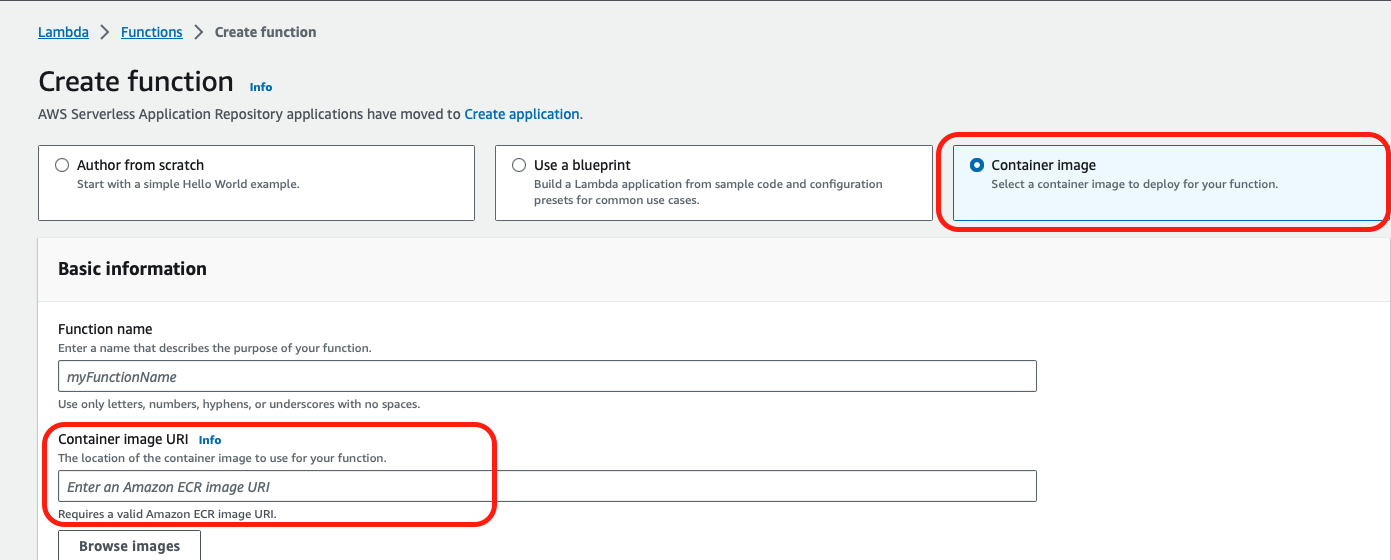
The next time the Lambda function is invoked, it is rebuilt from the most recently uploaded Docker image, which is always the one most recently uploaded by push_lambda_to_ecr.sh
As you can see, although there are quite a few moving pieces to this pipeline, it allows for seamless CI/CD and version control that doesn't yet in Fivetran today. We've developed pieces of this pipeline, and although we haven't finished it yet, we'd love to hear updates as the Fivetran team continues to explore connections to code repositories. Please feel welcome to reach out if you have additional questions.
Best,
Nick
-
Please also note that there are additional IAM policies needed to allow our Fivetran Lambda IAM role to talk to AWS ECR.
-
Thank you so much Nick,
This is amazing and super helpful detail. I will keep you informed of our progress.
Alison
Please sign in to leave a comment.
Comments
4 comments