Connector Improvement: Pipedrive Connector : deal_history related child tables problems
Answered
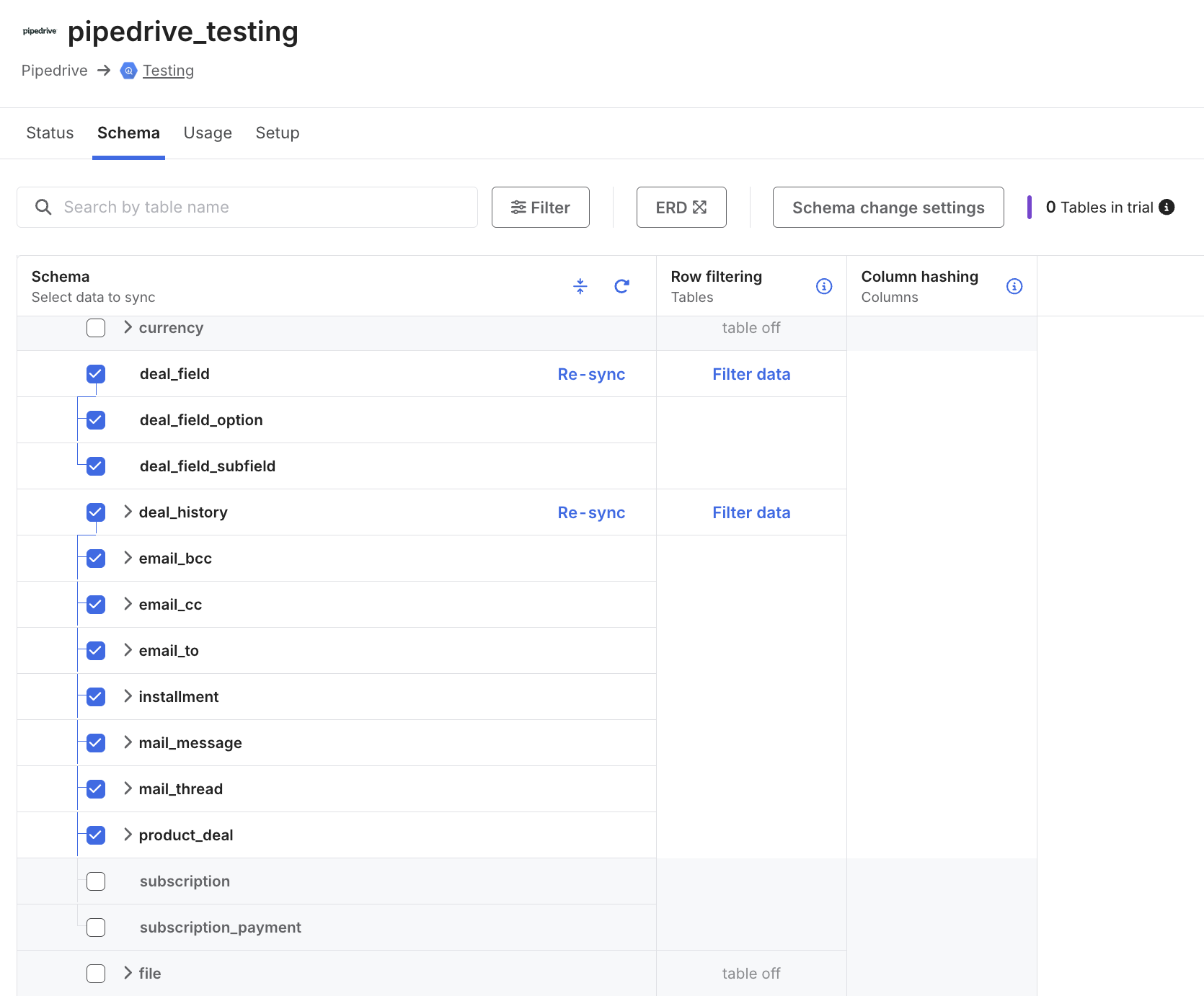
unrelated the Child tables by the name of email_bcc,email_cc,email_to,installment,mail_message,mail_thread,product_deal from the deal_history table, on my case i just want the deal_history table, but the child tables cannot be unselected from loading data because they have key columns that cannot be unselected , this is causing to load unnecessary data to the data warehouse and incrementing the connection cost for data that is not required
-
Official comment

Hi Condor Agency, Abdul from the Product team here. Thank you for reaching out.
Actually, we recently rolled out a feature that addresses exactly what you're looking for. It's called Universal Table Deselection, and it gives you full control over which tables sync to your warehouse, including child tables.
Here's how you can deselect those child tables:
- In your Fivetran dashboard, click Connections in the left sidebar
- Select your Pipedrive connection
- Go to the Schema tab
- Find the child tables you mentioned (email_bcc, email_cc, email_to, etc.)
- Deselect each one - you can now do this independently while keeping deal_history selected
Once you save your changes, those tables will stop syncing.
Let me know if you run into any issues or have questions!
Please sign in to leave a comment.
Comments
1 comment