Other: Custom Roles Should Include Account-level Option for Teams (Manage All, View All, None)
Answered
Future State (desired): We want members of a new team, based on a new custom role, to be able to be configured, at account-level, for Teams (Manage All, View All, None). I consider request to be at least as much a "Request for a Fix" as it is a 'New Feature Request'
Feature Request Thoughts: Line 2 of https://fivetran.com/docs/using-fivetran/fivetran-dashboard/account-settings/role-based-access-control#overview, asserts that "RBAC ensures users only have access to the resources relevant to their responsibilities", but this seems incorrect in the context of Fivetran Teams (maybe related also to Okta SCIM groups integration into Fivetran Teams), for the following reason: Only a very highly-privileged user (over-provisioned for the purpose I'll describe below) is able to view membership of teams beyond the team in which the individual is herself actually a member. Whereas I, as Account Admin, can create a custom role and map it to a new Team (as you'll see below that I did both), I cannot seem to grant Teams: (Manage All, View All, None) to it. In our specific case, we do not want those members to manage or change anything, just to view Team membership (in order to provide evidence of user-access by team during compliance audits), but it doesn't appear that this is available.
This is what we are requesting...
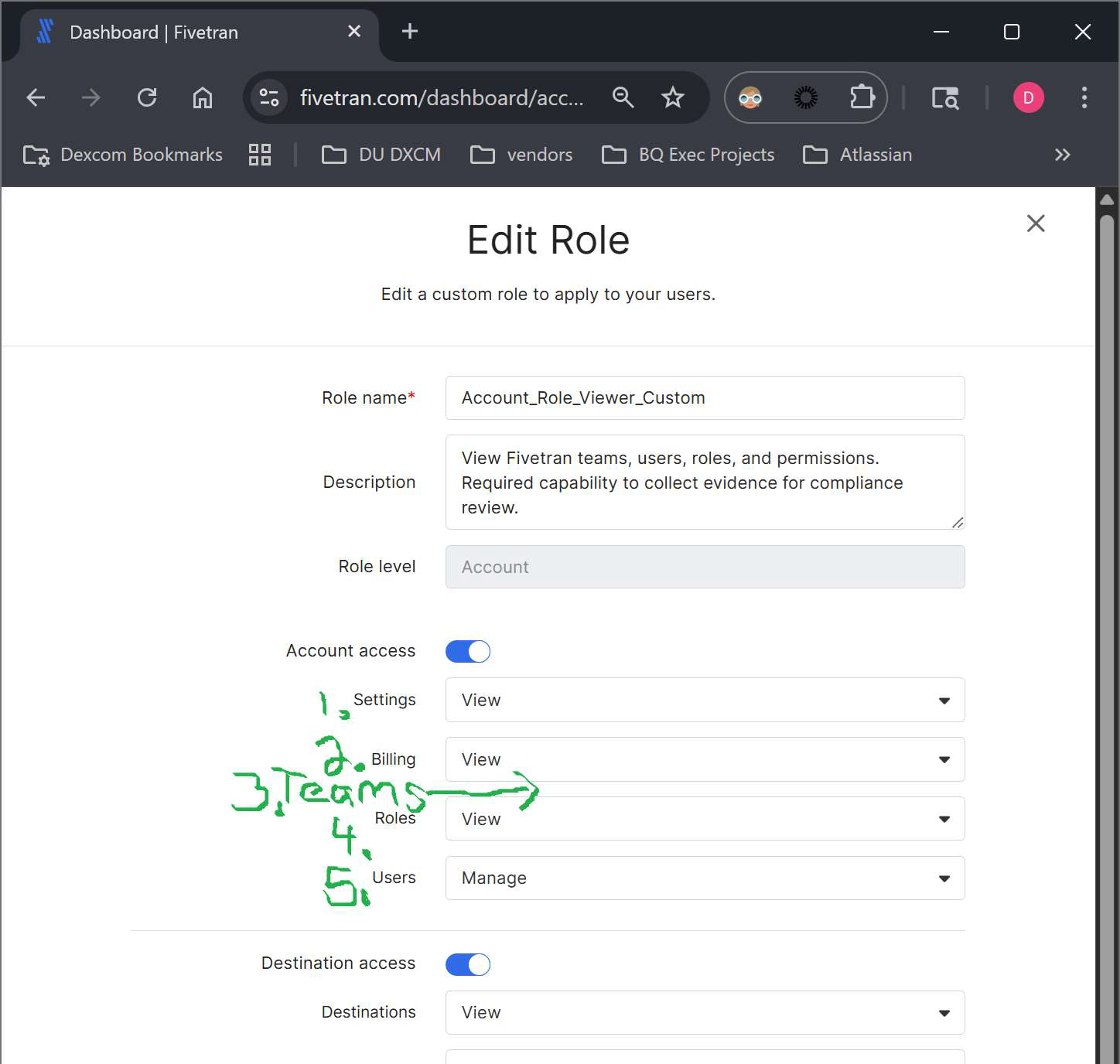
If I have to grant these people 'Account Admin' group membership, then these people, in fact, are highly over-provisioned with Fivetran permissions. On the other hand, if Fivetran product engineering agrees to add, for custom roles, an Account-level 'Teams' option (Manage or View or None), then Fivetran Teams will be in keeping with your aforementioned assertion that… "RBAC ensures users only have access to the resources relevant to their responsibilities"
-
Official comment

Hi Daniel,
This feature is not currently on our roadmap. Feedback and upvotes on requests help us assess demand for new functionality, so every upvote here strengthens the case to prioritize its development.
To better understand your requirements, could you provide more details on your use case? Specifically, it would be helpful to learn about the compliance scenarios you encounter and any workflows that this capability would help facilitate.
Thanks,
Amy -
Thanks for responding, Amy. At Dexcom, we highly and simultaneously value least-privileged access and transparency. As such, our use cases for this request are many, including compliance reviews and any number of instances in which people who either use, or have a stake in, Fivetran, but with less-than-Fivetran-account-admin role are supposed to understand which teams -- thus team members -- have what permissions granted in specific destinations or connections, and this feature request will deliver that. In my original screenshot, I show how the modification to custom role provisioning would fit nicely as a natural extension of your SSO evolution. In the screenshot below, I'll show the feature I'm requesting will allow people (in a team) assigned just such a custom role will be able to view connections and permissions for a given team, but of course the other tabs will, as we want, show exactly who is on each team, and what Destination-level permissions exist for it. If extended to Teams, your choices of 'Manage v. View v. None' are perfect, and in our case, at the account-level, we'll most often simply use Account / Teams / View.
As I mentioned before, I believe that this request is important to put your visibility of teams in line with Line 2 of you https://fivetran.com/docs/using-fivetran/fivetran-dashboard/account-settings/role-based-access-control#overview, asserting that "RBAC ensures users only have access to the resources relevant to their responsibilities". We do not want to grant account admin to those who simply need to read and understand Dexcom's Fivetran Teams setup.
-
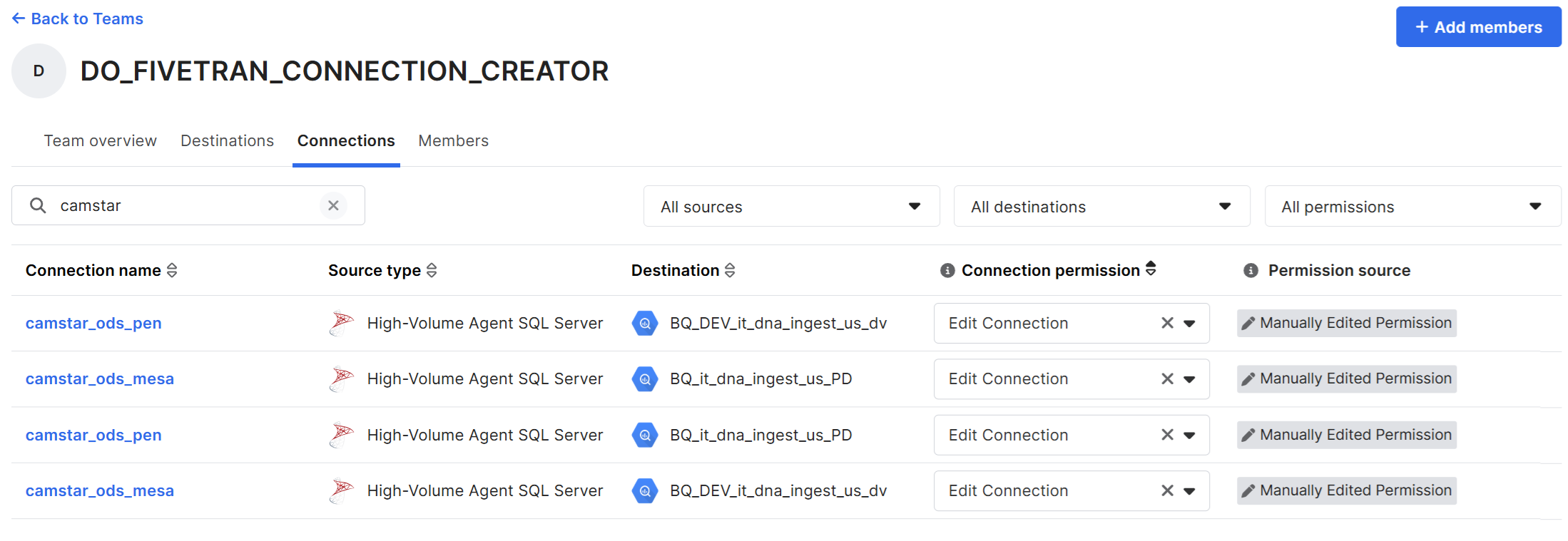
-
Beyond the generic response, I do look forward to a more detailed response.
Please sign in to leave a comment.
Comments
4 comments