Transformations: Add the ADLS file(s) details in the LOG table
Completed
Hi Team,
We have a connector which is extracting the data from ADLS and loading into Snowflake for multiple tables. And in the Fivetran metadata's LOG table, we are just seeing how many rows got processed for each of the target table, along with this we need know the list of ADLS file(s) got processed for a particular table in the Sync. This will help us in reconciliation of the data.
-
Official comment

Hi Abdul,
This feature is currently in development. Further updates will be posted on this thread as we get closer to a release.
Thank you,
Parmeet -
Hi Abdul, file level row counts are now available through our platform connector.
Thank you,
Parmeet -
Hi Prameet,
Do we have File name(s) also included? In which table we have these details, can you please help me with the sample query? -
Hi Abdul, yes. See the read_start and read_end events available in the log table. Together they capture the file size, table name, extracted row count and skipped row count in the message_data column.
select * FROM {destination_schema}.log
where message_event in ('read_start', 'read_end') and connection_id = {connection_id} -
Hi Parmeet,
The below is the screenshot of one of our latest sync and in the LOG table I couldn't see the entries for read_start and read_end message events:
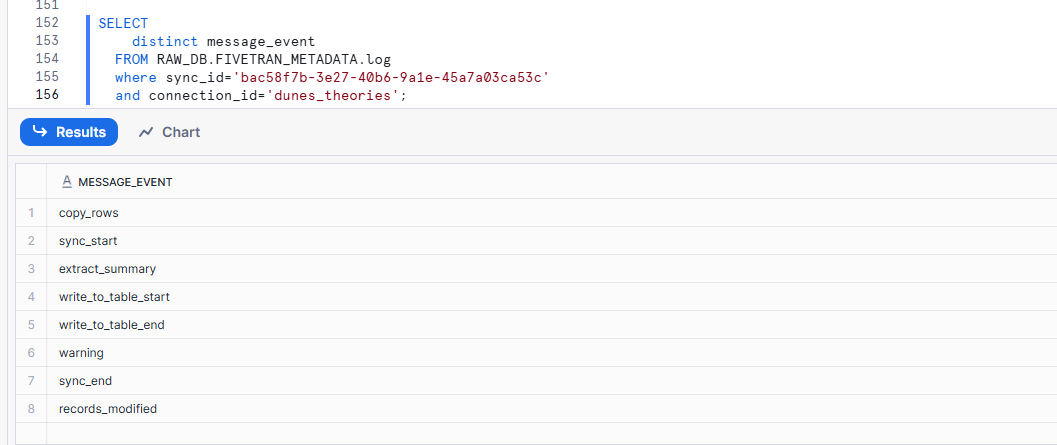
Do I have to check any other table? The Sync started at 2025-10-11 05:39:19.784 UTC and ended at 2025-10-11 05:40:39.361 UTC. Please help us in finding the message events related to the ADLS file. -
Hi Parmeet,
Please help us with this.
-
Hi Abdul, sending you an email.
Thank you,
Parmeet
Please sign in to leave a comment.
Comments
7 comments