Connector Improvement: SharePoint App Permissions and Consent
Completed
The SharePoint connector right now needs Admin Consent.
(I know the setup guide includes an option to "Allow user consent for apps from verified publishers, for selected permissions (Recommended).", or "Users can request admin consent to apps they are unable to consent to". We're not able to enable these at an enterprise level due to company policy.)
We had an Admin grant consent to the Fivetran App. When the Admin grants consent, it grants a list of Delegated and Application permissions.

When the user actually uses the Fivetran connector, it uses either the Delegated permissions or the User's direct permissions to access SharePoint. One of the permissions that the User needs is Sites.Read.All, but that permission is not a Delegated permission, so users who don't have that permission natively still get prompted for Admin approval.

Is it possible to add the Sites.Read.All as a Delegated permission (or switch it from App to Delegated)? Or is there another way to preemptively grant consent via the Enterprise App to users assigned to the App?
-
Official comment

Hi Daniel,
Thank you for reaching out and working to get our Sharepoint connector setup for you.
I checked with our engineering team and we are a little confused by your description as we currently ask for
Sites.Read.Allpermission as Delegated Permission.Can you share a little more about why you were thinking otherwise?
Thank you - Alison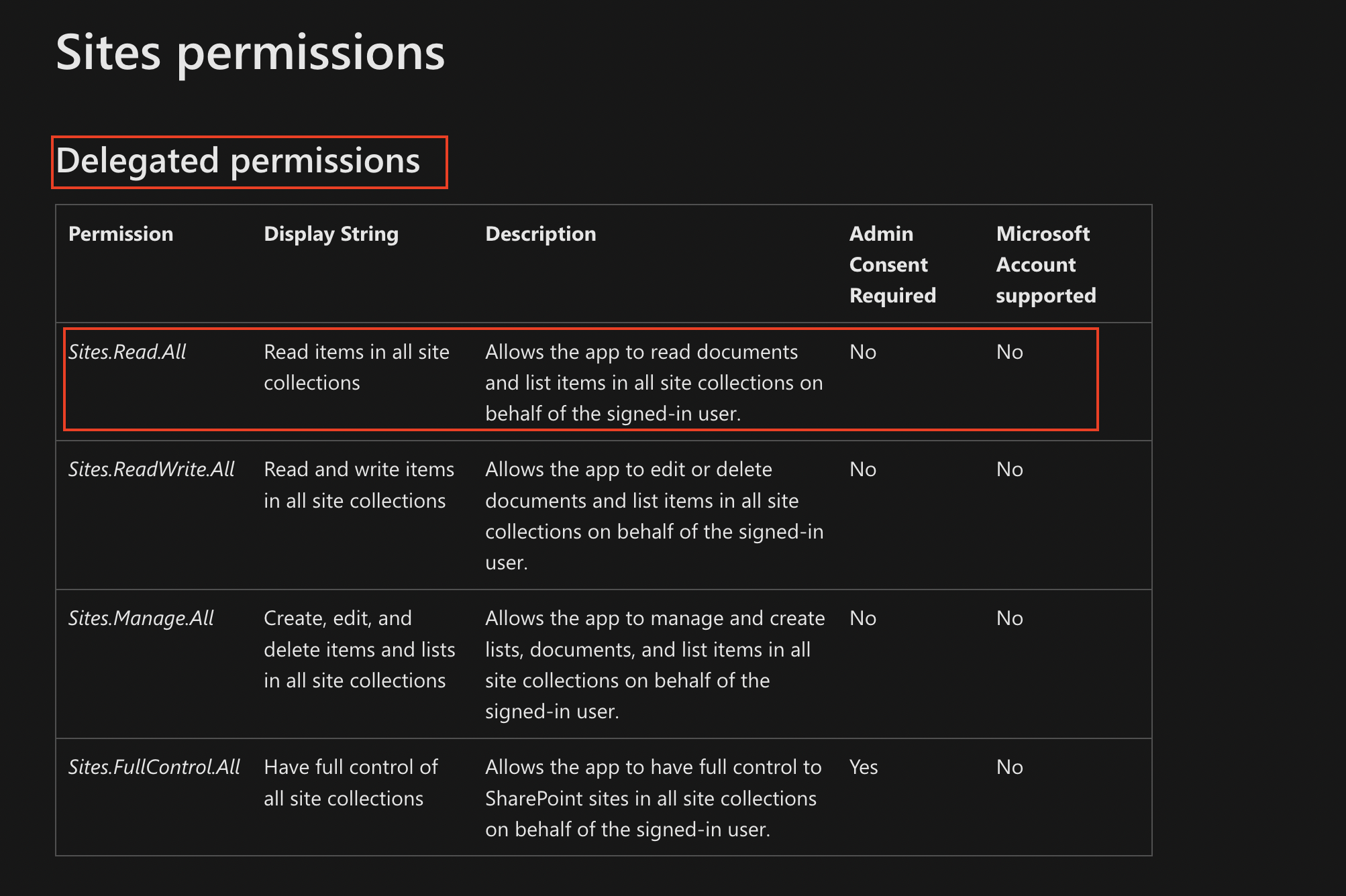
-
Hi Alison,
Specifically it doesn't look like the Admin Consent portion includes the Sites.Read.All Delegated permission, only the User Consent does. After our admin completed the consent workflow, the application permissions appeared as my first screenshot above. He added me as a user of the application, and I still get asked for admin consent when I try to connect a new site.
Maybe without getting into specific permissions, the behavior we're looking for is:
- Admins provide consent for Fivetran to access SharePoint
- Admins add users to the Azure Application
- Users can connect without needing additional consent or whitelisting specific sites.
The permission I asked about above was just a guess at achieving this - our admin noticed his user record had the Sites.Read.All, while the application doesn't Delegate it to its users (it's an App permission instead).
-
Hi Daniel,
Thank you for the additional information. We need to figure out a good solution here.
Could you please open a support ticket so we can get to the bottom of if we should think about this as a bug/issue on our current setup or a feature request.
Please mention "Height Ticket T-434751" as that is our internal tracking system and will allow the support team to find and link all the information you have provided to date in this discussion.
Best
Alison
Please sign in to leave a comment.
Comments
3 comments